
How to write effective Copilot instructions for developers
Introduction
As a developer, leveraging AI tools like GitHub Copilot can significantly enhance productivity and code quality. In this post, I'll share my personal insights on how to effectively use Copilot in any project.
I confess that when I started using Copilot, I was skeptical about its ability to understand the nuances of my main language, Javascript/TypeScript. However, after experimenting with it in various projects, I've found that with the right prompts and context, Copilot can be a powerful ally.
The key to achieving the control and the precision you want is to provide clear and concise instructions.
Setting Up Copilot Instructions
Here are some strategies I've found useful:
- Install the Copilot extension for your IDE (e.g., VS Code). I primarily recommend using Visual Studio Code for the best experience with Copilot, I also tried other IDEs like JetBrains IDEs but the experience is not the same so far.
- Create an empty
.github/copilot-instructions.mdfile in your project root. This file will contain specific instructions for Copilot to follow when generating code. This location could be changed in the future but for now, this is the standard for general purposes. If you want to have different instructions per folder, you can create a.github/instructionsfolder and add specific instruction files there with this standardSOMETHING.instructions-mdfor exampleUNIT_TESTS.instructions.md. - That's all, your next step is to write clear instructions.
Topics proposals to cover
Here are some topics that you might want to provide more context to Copilot:
- General Guidelines
- Formatting and Linting
- Naming Conventions
- Documentation and Types
- Testing Practices
For example, from my experience... I tend to prefer explicit types while I'm coding, so I include that in my instructions, on the other hand, I also like to keep in mind while developing good practices described in the Typescript Deep Dive, or PSR-12 for PHP developers, or Sun Java Style guide for Java developers. The AI will adapt to your preferences as long as you provide clear info.
Example Instructions
Here are some examples of instructions you can include:
At the end, your VSCode Copilot setup should look like this:
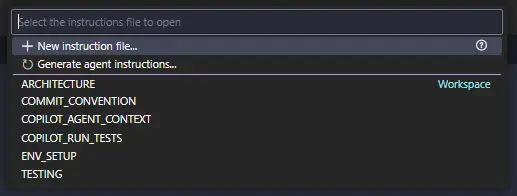
I encourage you to customize these instructions based on your team's coding standards and project requirements. The more specific you are, the better Copilot can assist you. In addition to the above, I would also suggest checking out some language-specific Gist instruction files that I made for some personal projects:
Conclusion
And that's my approach!, I hope you find these tips helpful in enhancing your development workflow with GitHub Copilot. Remember, the key to getting the most out of Copilot lies in providing clear and detailed instructions. Happy coding!